How Kudos Works: A Complete Guide
Recognition
Updated on
September 28, 2026
by
Taryn Hart

X min
Recognition
Updated on
September 28, 2026
by
Taryn Hart
X min
We often get asked, “how does Kudos work?”
Kudos is employee recognition software, and it works by giving your people a simple way to send a recognition message (with or without points attached), that is tagged to company values, shared on a company-wide feed, and tracked over time.
That's the recognition loop: recognize, reinforce, redeem, report.
Kudos runs on that loop, but the details of how each layer is designed, is what makes us unique.
The entire Kudos platform is designed to support our Vision: To unlock human potential by making contributions visible, valued and connected to lasting personal and organizational success.
So, here's how Kudos works — layer by layer.
First, let’s quickly get some tech-language out of the way (our Kudos Platform Glossary will help too!):
And yes, we help set all that up! Now, let’s talk about how recognition works in Kudos.
Every recognition moment in Kudos begins the same way: someone clicks Recognize someone, picks a person, group of people, or team, and writes a message. That's it. There's no approval queue standing between the thought and the send.
A few things happen when that message goes out:
📓 Helpful resource: Lack of recognition is now the #2 driver of work-related stress (Deloitte, 2026). This is why orgs need to invest in recognition software, and why Kudos exists. Read more → Deloitte's 2026 Gen Z & Millennial Survey: 8 Takeaways for HR Leaders

Kudos is an employee recognition and rewards platform, but Kudos Rewards are always optional. You can run Kudos as:
If you decide to have recognition + rewards, then this is where points are involved.
Think of this as pre-allocated point buckets tied to certain features in the platform:
Example: When a manager gives an award, it draws from that program's Point Bank, not from their own personal point allowance. That distinction is what empowers a manager to award exceptional performance without triggering an expense report. Point Banks also keep things accessible to managers who have large teams.
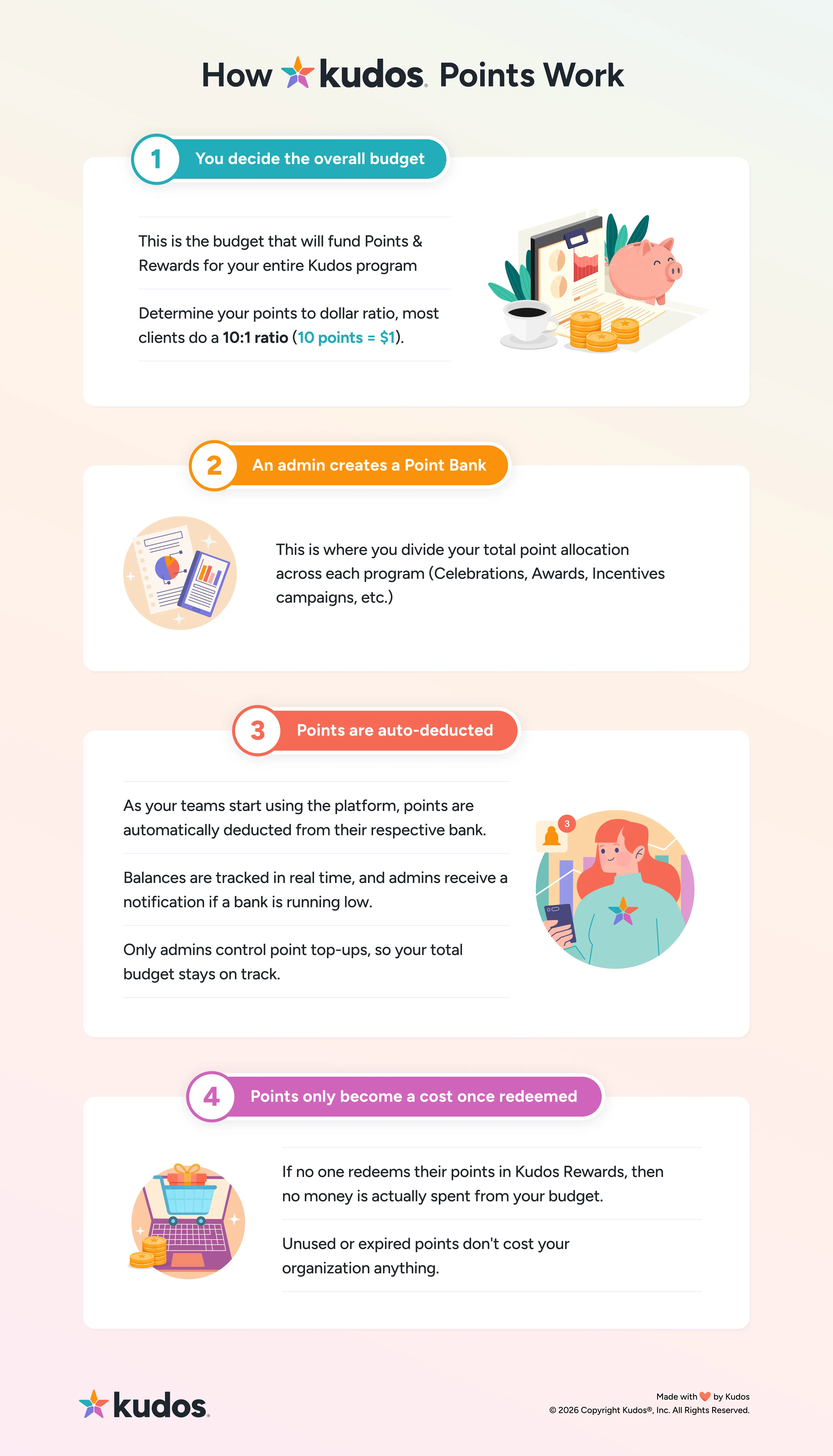
If you choose not to use rewards, then there are simply no points displayed or used in the Kudos application.
Points themselves have no cash value until an employee redeems them. That one rule is where your budgeting conversations will come in. Unused or expired points don't cost your org anything.
Redeeming a reward: Employees browse the Rewards Catalog (gift cards, merchandise, travel, experiences, charitable giving, or company swag) and check out using their point balance.
Your org decides what points-to-currency ratio you would like (a 10:1 ratio is the most common setup) and can set points to expire annually, quarterly, or never, which is one of the few levers that meaningfully controls year-over-year reward spend.

📓 Helpful resource: See how a rewards budget breaks down by industry → Building Your Recognition & Rewards Budget (PDF)
A recognition message doesn't disappear into a private inbox. It appears on the homepage, where anyone can react, comment, or endorse the message. Just like a social media channel, this is a scrollable feed where anyone in the organization can view and engage with recognition posts.
From there, the message will live in a few more places:
This is the visibility part of recognition that is critical. By facilitating recognition often and showcasing it to keep it visible, you motivate more of the behaviors and values you want to see in your team.

Kudos surfaces team recognition directly on the manager's homepage. The "Your recognition at a glance" shows exactly how many of their direct reports they've recognized in the last 30 days.

Managers have additional access to certain programs (features) in Kudos, to allow recognition to happen more freely and to alleviate workload from admins:

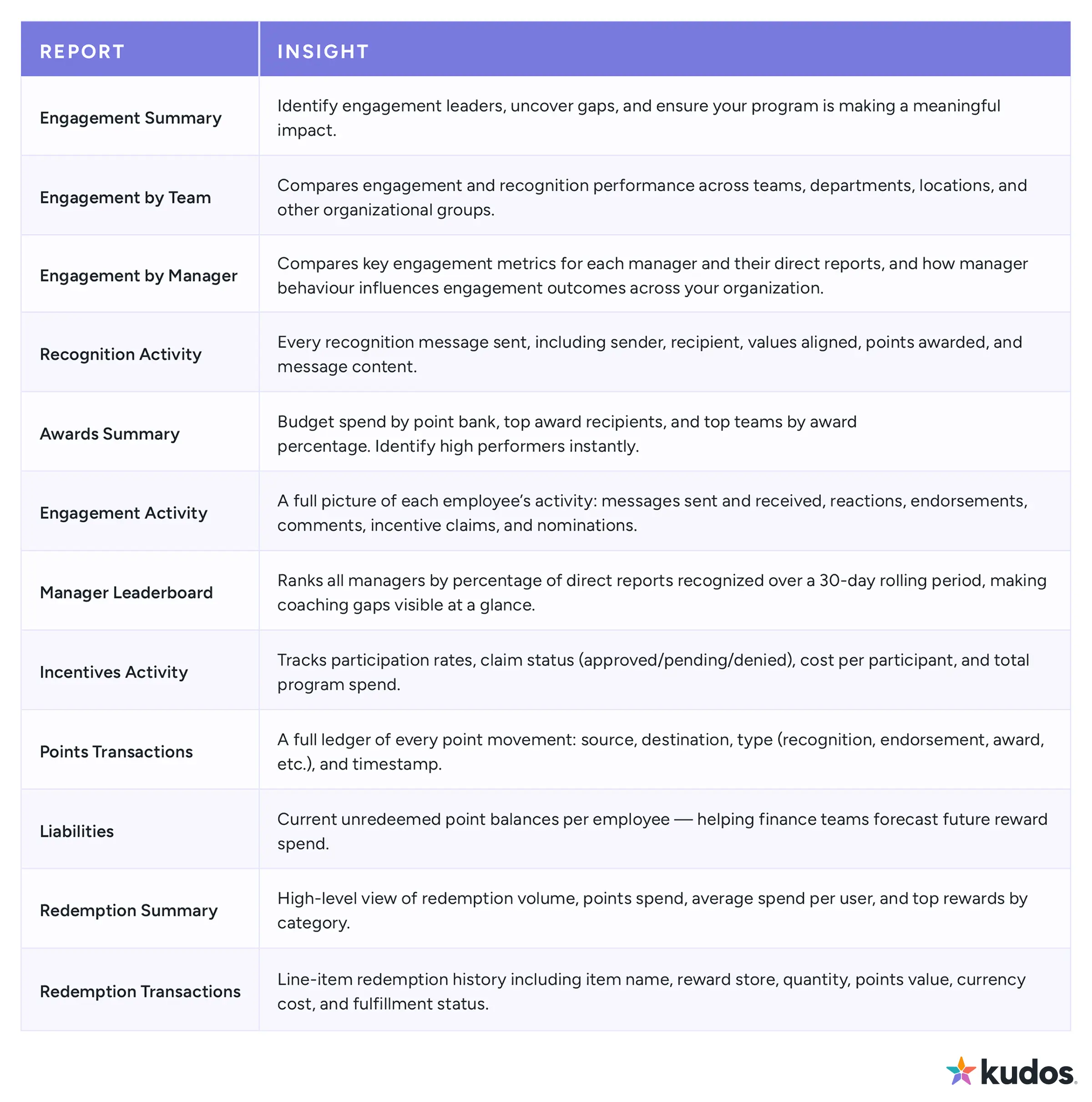
Just like any other tool, the activity in your Kudos platform is tracked and measured through Kudos Reporting. It's the difference between "we think our culture is good" and being able to show why.
The reports for your data serve three different audiences:
Here’s all the reports available through Kudos Reporting:
This is where all the other features in the Kudos platform come in:
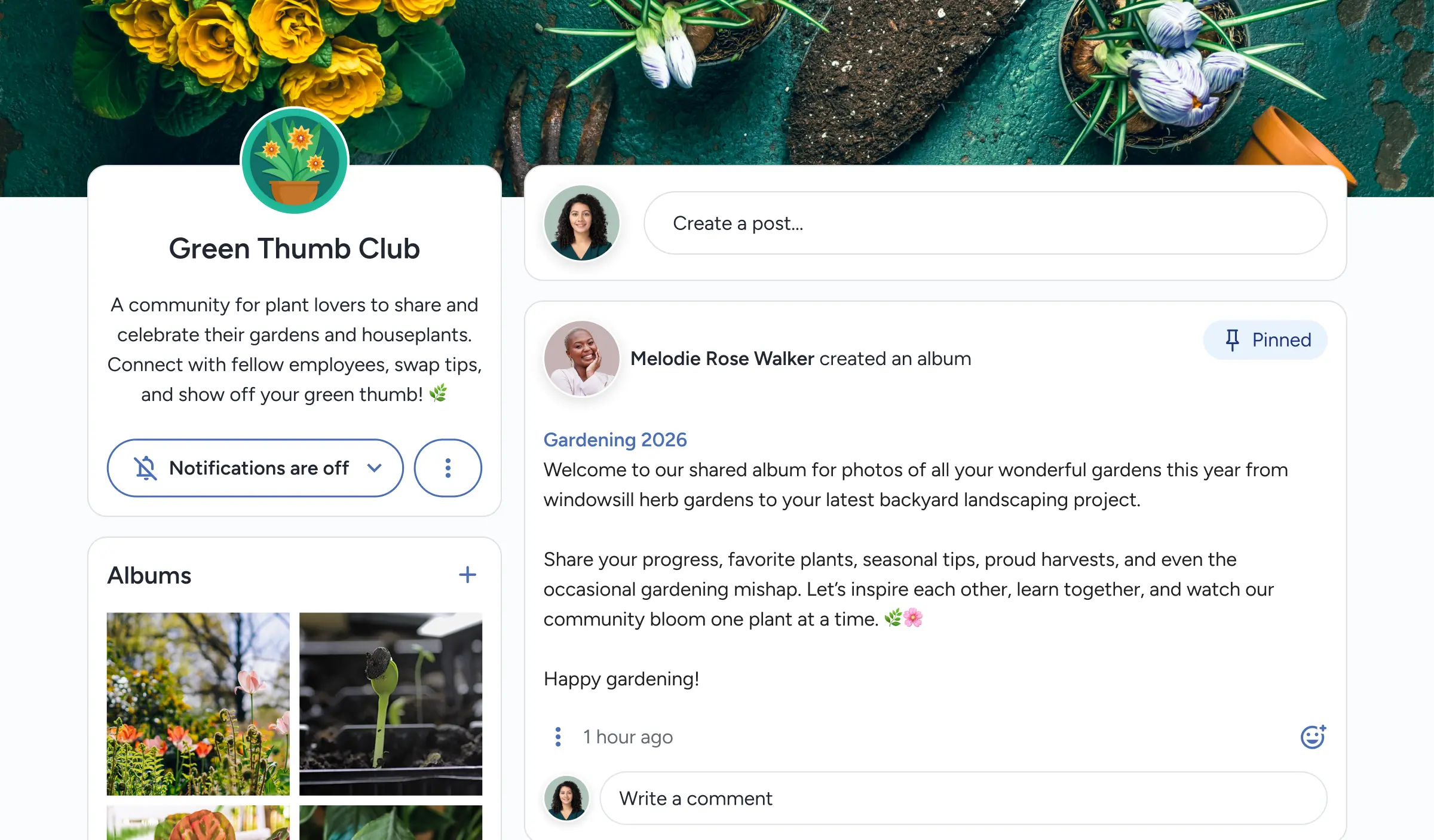
Your entire company culture exists in one platform. Engagement is happening organically in Kudos.
Recognition is being sent, a card is being signed, a summer walking challenge winner is being awarded, a Spotify playlist is being added in a Space, an Amazon gift card is being redeemed...
That’s engagement happening naturally in the culture you’ve designed. It’s not forced, it’s not mandatory. It’s real.
Your entire workforce can participate in recognition, whether they work at a desk, on a factory floor, or in the field.
For deskless workers: Admins can generate sign-up codes (instead of company emails), so deskless workers can log in using their Employee ID, for example, instead of an email.
Kudos is also available on all mobile devices, so the Kudos experience can happen anywhere, anytime.
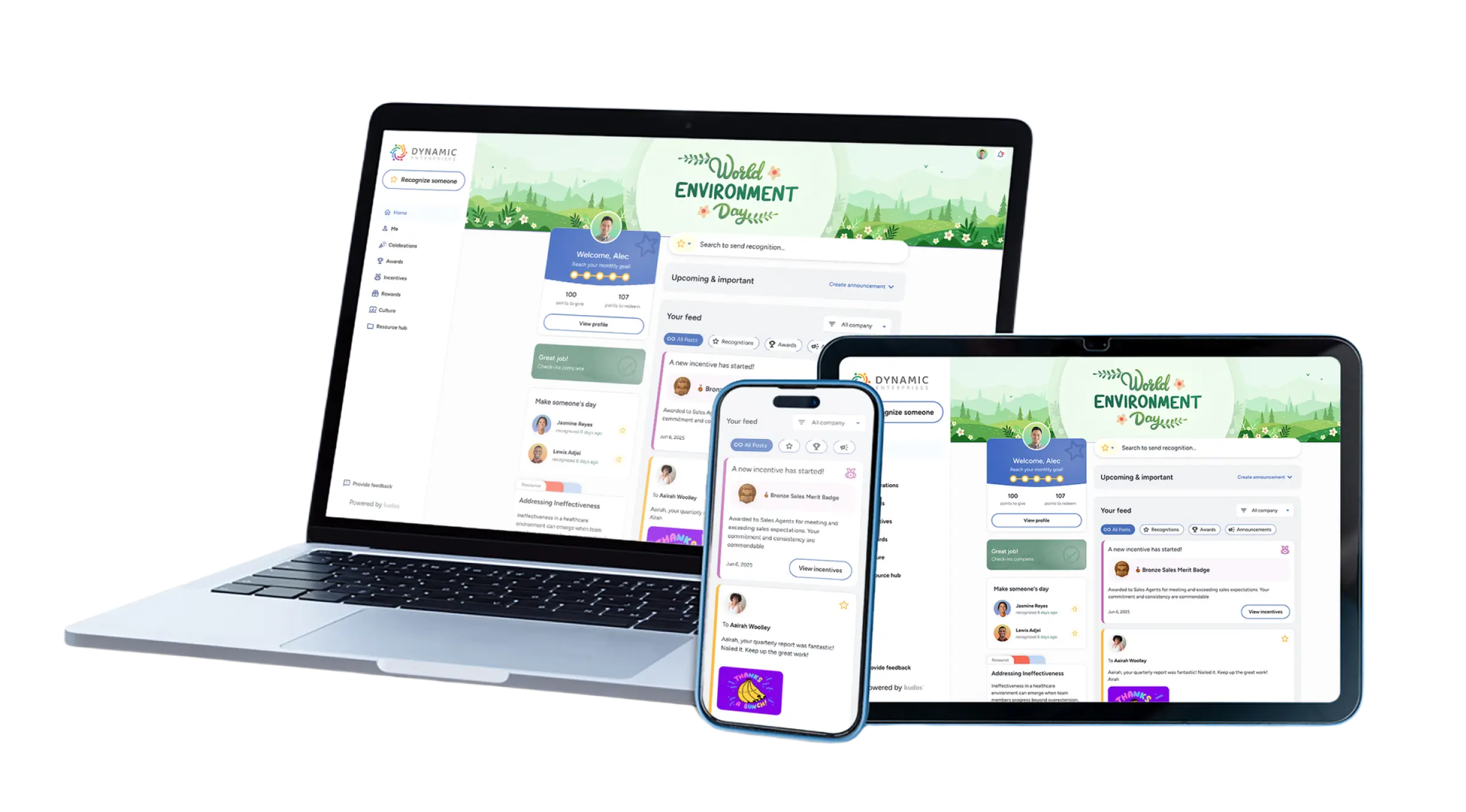
We know that none of this works if it lives in a tool people must remember to open.
The last layer is integration: Slack, Microsoft Teams, and Outlook let people send and see recognition in Kudos without leaving the place they're already working in.
HRIS platforms (Workday, BambooHR, ADP, UKG, Paylocity, and 50+ others) sync employee data automatically, so your org chart inside Kudos never drifts out of date.
SSO, OAuth, and SAML handle login through whatever identity provider your company already uses.
Kudos is also ISO 27001 certified, so security stays top-of-mind.
We’re committed to helping you achieve your culture goals. Here’s what you can expect from the first call to the first 90-days after onboarding:
If you're curious about what the Kudos platform looks like and want to see it in action, you can watch a recording of our product demo.
🎥 Access our most recent product demo video (quick form, then it's yours!) 👇
How does employee recognition software actually work?
It gives employees a simple way to send recognition that's tagged to a company value, optionally paired with points, and tracked over time. The recognition message itself is instant; the value comes from the pattern it builds across an organization.
Do employees need points to use Kudos?
No. Points are optional in Kudos. A recognition message with zero points is still fully counted, visible, and tagged to a value — many organizations run programs specifically without a points component.
What happens to unused or expired points?
Points have no monetary value until redeemed, so unused or expired points don't create a liability or cost anything. Organizations typically see about 60% of allocated points redeemed in a given year.
How does Kudos help managers recognize their teams consistently?
The homepage shows each manager their recognition activity over the last 30 days, including which direct reports haven't been recognized yet, with a one-click option to send recognition immediately.
What's the difference between Kudos recognition and Kudos Spaces?
Both are features in the Kudos platform. Sending recognition is the sole purpose of Kudos. Kudos Spaces is a community hub inside the platform where common interest groups, ERGs, wellness communities, etc, can exist.
Can Kudos integrate with our existing HR systems?
Yes. Kudos syncs automatically with 50+ HRIS and payroll platforms (Workday, BambooHR, ADP, UKG, Paylocity, and others), plus SSO/SAML/OAuth for login and Slack, Teams, and Outlook for day-to-day use.
Does recognition data actually tie back to business outcomes?
It ties back to the metrics HR and finance already track: engagement, participation, and reach at the program level, plus reward liabilities and redemption spend at the budget level — all pulled from the same underlying recognition data.
Admins: Users with full access and permissions to their Kudos platform, including Point Banks, integrations and user provisioning, all features and programs, rewards catalog, organization-wide reporting, and your platform’s customizable theme. Your organization decides who it would like to have admin-level access, with no limit to number of admin seats.
AI Recognition Assistant: An AI-powered tool built into sending a recognition message that helps a user turn a rough idea into a clear, personalized message with one click.
Albums: Photo and media collections, like event photos, that can be uploaded to a Space. Albums only exist inside Spaces.
Announcements: An internal communications tool with scheduling, audience targeting, and “mark as read” tracking for company-wide news.
Awards: Formal recognition tied to specific achievements or events, funded through dedicated Point Banks so managers can create and send an award to a team member without administrative friction.
Celebrations: The automated recognition of individual milestones — birthdays, work anniversaries, onboarding — so key moments are never missed or left to manual tracking.
eCards: Digital cards used to celebrate individual milestones — birthdays, work anniversaries, onboarding — that users can sign and add personal messages to.
Employee Recognition and Rewards Platform: Software that helps organizations build a culture of appreciation by combining peer-to-peer and manager recognition, optional points-based rewards, and analytics in one system.
Endorse: A one-click way to add support to someone else's recognition post. A recognition message can be endorsed with or without points.
Engagement Reports: Reporting that shows recognition activity across the organization — participation, reach, activation, and trends over time — used to spot what’s working and what’s falling flat.
Homepage: The central hub for daily activity showing the recognition feed, the Upcoming & Important section for celebrations and announcements, and a personalized user experience.
Incentives: Engagement campaigns designed to drive participation in specific company initiatives (security training, a wellness challenge, completing an eNPS survey), tracked through a claim and approval workflow in the platform.
KudosTV: A live, continuously updated feed of recognition messages displayed on office screens or digital signage, often paired with QR codes so people nearby can engage with the message on their mobile device.
Managers: Users with direct reports (people who report to them), and get additional access to features in Kudos, including Celebrations, Awards & Nominations and their team's Engagement Reports.
Manager Leaderboard: A ranked view of all managers based on the percentage of their direct reports recognized over a rolling 30-day period.
Nominations: An in-platform workflow for running award nomination programs — submitting, reviewing, and approving peer or manager nominations.
Peer-to-peer recognition: Recognition sent between team members at any level, not just top-down from a manager.
Point Banks: Pre-funded budgets that admins assign to specific programs (like Awards, Incentives, or Celebrations), letting managers give out points without using their own personal allowance or filing an expense report.
Profile: A user's personal page in Kudos displaying their name, a profile photo, title, location, their points-to-give and points-to-redeem, their recognition activity, and cards and awards received. Everyone in the platform can view each other’s profiles to learn more about the person.
Programs: The organized initiatives and features running inside Kudos — Awards, Celebrations, Incentives — each with its own Point Bank, rules, and reporting. Admins have access to manage all programs, while managers and users have selected access. These permissions can be customized to your organization’s needs.
Recognition message: Direct recognition sent in Kudos that appears in the homepage. The receiver of the message will be notified of the recognition message through an email notification, an in-app notification as well as any selected integrations (Slack, Microsoft Teams).
Reporting: The full suite of dashboards and reports available to admins and managers — covering recognition, rewards, awards, incentives, and engagement in one place. Reports can be customized and downloaded as CSV files or PDFs.
Rewards: The optional rewards layer of Kudos, where users can redeem their earned points through the rewards catalog.
Rewards Catalog: The configurable selection of items employees can redeem points for, spanning gift cards, merchandise, travel and experiences, charitable giving, and custom company swag.
Sign-up codes: Admins can generate sign-up codes (instead of company emails), so deskless workers can log in using their Employee ID, for example, instead of an email.
Spaces: A social, visual community hub inside Kudos dedicated for groups like ERGs, health and wellness, hobbies and interests, and company events. Each Space has its own feed for posts, and the ability for users to create and upload albums.
Upcoming & Important Section: A dedicated area at the top of the Kudos homepage where upcoming celebrations and company announcements are pinned.
Users: Anyone who is granted access to Kudos within the organization.
Values-tagged recognition: A recognition message connected to one or more of an organization's core values or qualities (e.g., "Ownership," "Collaboration") at the time it's sent.
Your Recognition at a Glance: A small section on the homepage (only visible for managers and admins), showing leaderboard rank and how many direct reports have been recognized in the last 30 days.


How healthcare teams are helping their people feel seen.
Get Your Guide