What’s New in Kudos: Your Quarterly Product Update
Recognition
Updated on
October 16, 2026
by
Margaux Morgante

X min
Recognition
Updated on
October 16, 2026
by
Margaux Morgante
X min
This quarter, Kudos made recognition easier to send, easier to notice, and easier to manage. Employees can now recognize colleagues from Slack, send awards privately, and see birthdays and work anniversaries flagged automatically on profile pictures. Admins can tailor points rules, turn off GIFs, review account activity, and track engagement by team and by manager.
The Kudos Slack integration makes it easy to send recognition without leaving Slack. A Kudos admin installs it from the Integrations page and selects the Slack channels that should have Kudos. Anyone in that channel can then type /recognize to open the recognition form, and the recognition appears on the Kudos wall. Reactions, comments, and endorsements added in Slack sync to the same recognition message in the Kudos web and mobile applications.
All users can now send private awards in Kudos. Private awards suit moments that deserve big recognition when a public post is not the right fit.
You can now configure a different message and point amount for each recipient when sending awards in batches. Award senders can download the new personalized CSV template, fill in a message and points amount for each recipient, and upload it. The original template, which sends one message and one point amount to everyone, is also still available.
Kudos admins can turn on comments and reactions for an announcement when they create it. The setting is optional and applies to that announcement only. Announcements can also now contain up to 10,000 characters.
Points sent with an activity in Kudos, such as a recognition message or endorsement, now display only on the My Profile page for all users.
Kudos has made improvements to the output of AI message refinement as part of ongoing optimizations to the Kudos AI Recognition Assistant.
Kudos profile pages now include a personal banner next to the profile picture and an updated Profile tile. Users can make it their own and show off their personality! The redeemable points display on a profile now links directly to Rewards stores.
The new About tab on a Kudos profile now shows additional employee details. Employees can add an optional bio from their settings, which other members see when they view the profile. A great way to bring distributed teams together.
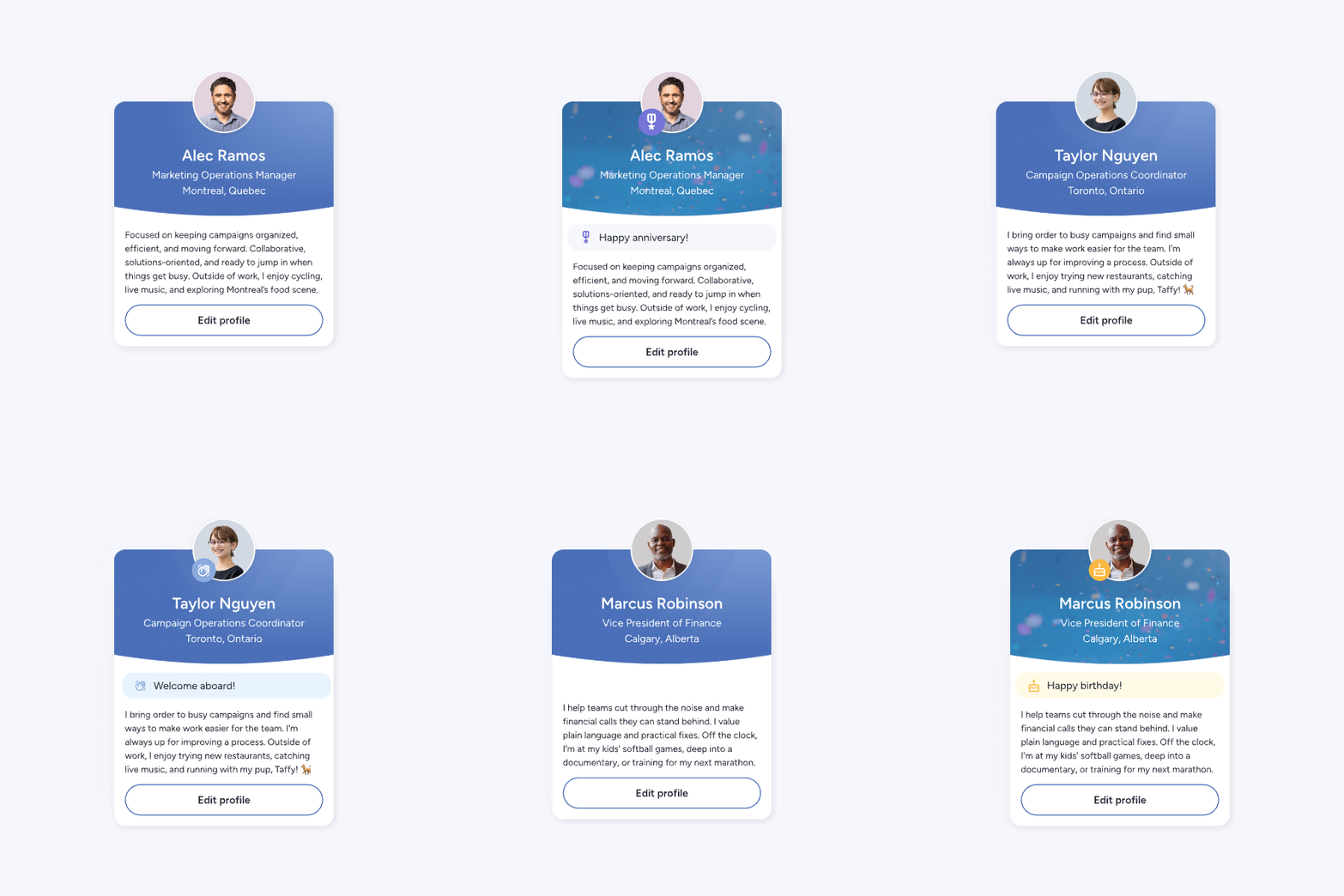
The Kudos profile info card has a new look, with an animated background that appears around upcoming and active celebrations. Adornments add a badge to a profile picture in the days leading up to and on the day of any celebration type set up in the platform, so milestones get noticed without anyone setting a reminder.
The Cards tab on the Kudos Celebrations page has a new “You’ve signed” view to find comments you’ve left on past cards. Filters and views now stay in place when you navigate back, and the Available to Sign tab sorts oldest to newest, so the most urgent cards come first.
The info pop-up on the Kudos celebrations calendar now includes a View Card option whenever a card has been generated for that celebration.
The Too Much Love rule limits how many points one person can give another within the same point allocation period (usually a month). Kudos admins can now apply the rule to everyone, to no one, or to everyone except selected teams. The setting is under Platform Setup, then Recognition options.
Kudos admins can exclude users on selected teams from earning redeemable points, which simplifies points and budget setup. Great for contractors or temporary workers who still deserve recognition but aren’t in the budget for points.
The new Feature Management page under Platform Setup lets Kudos admins turn off the built-in GIPHY option across the platform.

Kudos Global Admins now have a Security Logs page under Admin Tools. It shows high-level activity such as updated users and provisioned members.
Kudos admins can now filter the Users Table by team. Before, the filter could only search by department. Now it searches by membership in any team, including all quick team types, so admins can pull up everyone on a given team in one step.
This Kudos report helps admins identify teams that may need more active engagement and spot trends across groups in the organization.
This Kudos report shows the level of interaction and reach between managers and their direct reports across the organization.
Kudos admins can bulk send awards to deskless users by uploading Employee ID in place of email in the CSV. Deskless workers also receive a notification email for all Kudos system-generated emails except Rewards, and both notification and Rewards emails can be viewed and edited from My Settings.
German is now available on the Kudos Language and time page, and admins can set up translation overrides.
Every update this quarter came from how HR teams, Kudos admins, and employees use Kudos day to day, and there is more on the way. If you are an existing customer, reach out to your Client Success Manager to learn more about activating any of these features. If you are exploring Kudos for the first time, book a demo and we will show you what a recognition platform built to evolve looks like.
See you next quarter with the next round of updates.
Yes. The upgraded Kudos Slack integration is available to all clients. After an admin installs it from the Integrations page and selects a channel, anyone in that channel can use /recognize to send recognition that appears on the Kudos wall.
Yes. Admins and users can send private awards in Kudos for moments where a public post is not the right fit.
Download the personalized template when you start a batch send award in Kudos, then enter a message and a points amount in each recipient’s row and upload the CSV. Each row needs an email address or Employee ID.
Yes. Admins can disable the built-in GIPHY option across Kudos from the Feature Management page under Platform Setup.
Only Global Admins. The Security Logs page sits under Admin Tools and shows high-level activity, such as updated users and provisioned members.
Yes. Admins can apply the Too Much Love rule to everyone, to no one, or to everyone except selected teams from Platform Setup, then Recognition options.
Yes. German is available on the Language and time page, and admins can set up translation overrides.
.jpg)


Everything You Need for a Comprehensive Engagement Proposal
Get Your Guide